I Recall Central Park in Fall

img_0586

Flipping through a magazine looking for something to draw, I came across a couple strolling with their dog. I drew them, added a tree, and had to pull out my watercolors and add some leaves.

That illustration reminded me of walking with my husband through Central Park in New York City. Having just watched “Ferris Bueller’s Day Off” the lyrics “I recall Central Park in Fall” were in my head while I searched for an image of a couple in Central Park. I found a Getty Images photo to use as reference. It’s the lamppost that makes it Central Park.

img_0588

I’m always amazed how one idea or spark of inspiration can lead you down a path. Actually this was the topic of one of my early posts: The paths our art projects take us on:

“It’s funny, how a project can start us on a path. A path similar to the branches of a tree. The path may be fairly straight – projects similar to one another. Or the path may be twisty – each project taking a unique turn. The path can be long – each project sparking the idea for the next one. Or the path may be short – as we experiment with something that doesn’t work out or fails to inspire us any longer.
We follow a path until it ends. Until we have reached the end of that train of thought. At that point, we forge a new path, based on something different that inspires us. But each path we take, is related to the others, just like the branches of a tree.”

Drawing Digitally

img_0538

With InkTober motivating me, I’ve been focused on my sketchbook this month. But sitting on the couch this afternoon I grabbed my iPad and stylus pen to get back to drawing digitally. The boy pulling his wagon was the last one I did weeks ago.

The whole feel of drawing on the iPad is different than pen on a page in the sketchbook. It took me a while to get used to it again. And I miss being able to lean my hand like on the sketchbook! Any touch creates lines on the iPad.

I use a ZXU fine point stylus pen which I found on Amazon. (This is not a sponsored post.) I draw in Adobe Illustrator Sketch and Adobe Photoshop Draw because I like working in layers and you can send your files from the iPad directly to those programs on your desktop.

Do you draw digitally? What tools do you prefer? Have any tips to share?

You never really know how a drawing will turn out

img_0478

As you put your pen to the page to make that first mark, you never really know how things will turn out. At least I don’t know. Sure I have a vision in my head, but that doesn’t mean it will turn out that way.

Personally, I don’t really plan much, I get an idea and just dive in and see what happens. If I’m drawing in ink – which I’m doing a lot this month for InkTober – I rarely do a pencil sketch first. Unless the drawing involves a face or body, then I will do some planning in pencil to get things looking “right.”

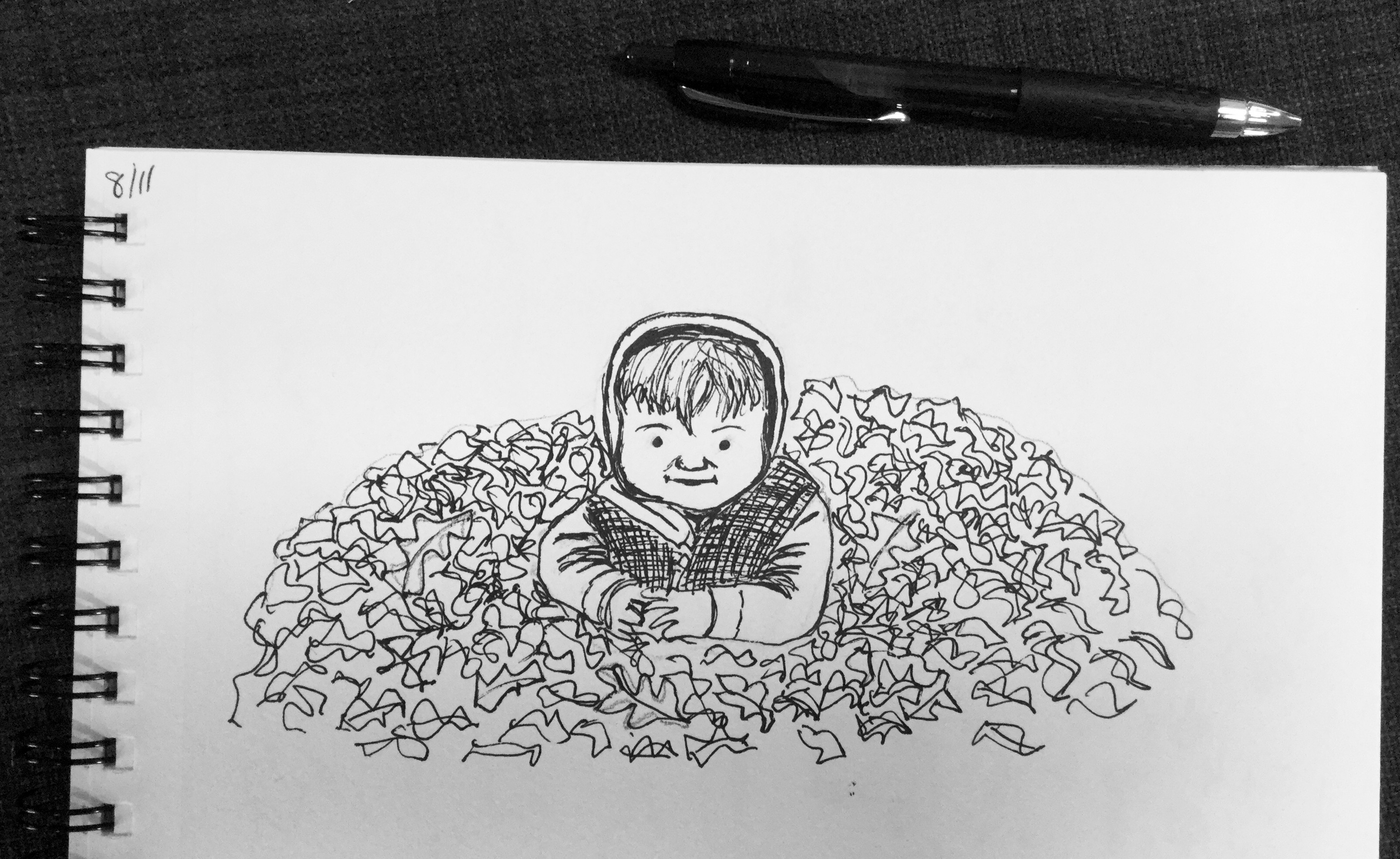
I was really pressed for time with this “little guy in the leaves.” The inspiration photo was one of my youngest son probably 8 or 9 years ago. I used pencil first to plan things a little – because you can’t erase ink. I was pleasantly surprised with the results in such a short time.

This drawing experience was the opposite of yesterday’s! I was drawing in the car during my older son’s practice. I first focused in on a nearby car. Within a minute or two of drawing the car, it drove off! Without the car there I had a hard time finishing that part. I drew the car in front of me, but my pen started running out, probably because I was drawing upright on the steering wheel. I ended up focusing on drawing the chain link fence. Like I said, you never know what the result will be when you start drawing!

See all my InkTober blog posts:

Creating a scene

Scarecrow

Now I don’t mean going to a party and ending up with a lampshade on your head! What I mean by “creating a scene” is I’m aspiring to create illustrations that have depth to them. In the past my illustrations and paintings have focused on a single object.

I created the scarecrow on my iPad using Adobe Sketch for the first time. (I’ve been practicing with Adobe Draw). Although I didn’t end up using the more Photoshop-like brushes. I’m still trying to get the apps linked to my desktop. It would be awesome to draw on the iPad and then be able to open the drawing in Illustrator or Photoshop to refine. And I think I had a breakthrough. 😀

Playing around with Adobe Draw

image

Today at the pool I pulled out my iPad and a stylus pen and drew a tree, followed by people in the pool. I’ve used Adobe Draw twice before and it’s something I want to do more of.

image

Previously my digital illustration was done by pointing and clicking the mouse in Adobe Illustrator on the desktop. Although I’ve wanted to do more digital drawing, sitting at the computer feels like work, so I usually end up with pen and sketch pad instead.

Earlier in the summer, I notice a scribbly line in notes and started drawing with my finger. After that I read about an artist that uses Adobe Draw and thought, “I need that!” Then I saw a stylus at my mom’s house and ordered one for myself.

image

Adobe Draw is awesome because you can work in layers like Illustrator. I haven’t even gotten to the point of opening files from Adobe Draw in Illustrator (to refine them), but I’m under the impression that you can do that, and that they’ll be vector files.

Drawing on the iPad is so quick, compared to traditional materials. Although there are things I’d like to do that I’m still figuring out. I plan on playing around more with this. 😀

I need to start, to figure out where I’m headed

imageI was working in my sketchbook today, without any real plan, just thinking of the beach. It occurred to me that you can try to have a detailed plan but in the end you have to just start, do the work, and see what unfolds. I thought this was an epiphany for me until I thought about my creative resolution.

I started late Dec. 2013, with no real plan other than being creative on a regular basis. I thought I might end up refinishing furniture! Instead, after trying a few things, I ended up working steadily in watercolor.

Today’s “ephinany” felt like a big deal because, for awhile, I’ve wanted to work on a bigger project. Something that would tie things together. Instead of feeling like I work on individual pieces.

I have a theme. I have inspiration projects (by other artists). I have ideas, but I don’t 100% know what the style and form of the project will be, and it frustrates me. Doodling in my sketchbook today I realized I need to dive in and start. I’ll never know what the final product will be, until I work through it. Just like my creative resolution, it will be a journey of experimenting, working, and evolving.

Spaghetti & Meatballs

meatballs
On Friday, after posting my limes, Charlie at doodlewash.com reminded me that I was “invited” to dinner. Here is an excerpt of Charlie’s original invitation:

“I’m inviting all of you over for dinner, because seriously, how cool would that be? During the month, if at any time you’d like to come to the party, just “bring over” a lovely doodlewash of something delicious to eat or drink by using the hashtag – #DoodlewashDinner.”

But how could I bring limes to dinner?! I couldn’t, so instead I made a favorite in our house – spaghetti and meatballs. Grab a fork and enjoy. And a big thank you to our host Charlie!